
In UX design, it is important to visualize how a user will interact with your product. Will they have questions or be confused? Or will the design be intuitive? Drawing the steps a user might take within an app can help app and UX designers understand where the user would think to go in order to solve their problem.
A UX flow or flow chart is a diagram that helps designers visualize the paths users take while using a product or app (Browne, 2019). The flow chart begins with where the user opens and begins using the app (entry point) and ends with the final action or outcome.

Flow Charts – Step-by-Step
Flow charts don’t have to be challenging to create; there are a few steps to follow, but in the end, flow charts are a great way to visualize the user’s flow while using an app. Carmen Browne created the list of the following steps:
The first step is to understand your user. In order to create a constructive flow chart, the designer has to understand the user’s needs and motivations. The problems that the user needs solved will help guide the flow of the chart. Incorporating key pathways into the flow chart will help the designer understand the different paths the user might take to solve their problem.
Next, the designer should create a flow outline. This outline works like a mind map and will help the designer visualize the different pathways. The outline will include the entry point (how the use opens the app) and the different pages that come along while the user is interacting with the app.
The next step for the designer will be about creating the elements of the user flow. This involves creating shapes and defining colors that will make-up the flow chart. This step will also involve the creation of the legend. Rectangles, circles, arrows and diamonds are most frequently used in flow charts.
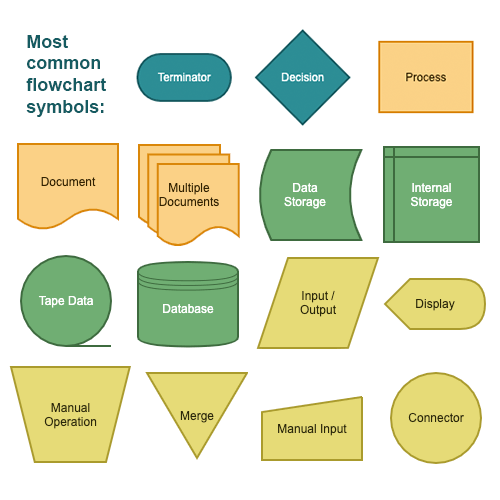
The fourth step is to refine the flow chart outline. This includes making sure the labels are clear and meaningful and that your colors work with the chart (Browne, 2019).
Recreation in Roswell – The App
For an information architecture project, I am going to create the design for app related to the City of Roswell, Ga.’s municipal website. This app focus on the residents and their interactions with the recreation programs, health and wellness activities, park/city news and facilities information.
The name of this app will be Recreation in Roswell. The purpose of the app is to allow residents and/or visitors a specific place to look at information relation to recreation programs, health and wellness activities, news and facilities. (Site map located here for general information).
The app will include information and links based in three main menus:
Registration – The menu includes a majority of the information in the app. This menu will be used by residents looking to sign up or find more information about the programs the city offers. There are art programs, programs for adults, health and wellness activities and so much more. In addition, this menu serves as the landing page for the most up-to-date program brochure. This will be linked as a pdf file for residents to browse.
Around the Parks – This menu includes more general information about the parks department. There will be a letter from the director that is updated every month. There is information about future plans for the numerous parks around the city. Roswell has a nationally recognized parks and recreation department, and this menu would give users an inside look at what is happening in the departments. In addition, there is a link for users to report an issue.
Parks, Facilities & News – This menu is for users who are looking for information about facilities, which include park pavilions, picnic areas and pool areas. Residents can reserve these areas for parties and events. There is also a link for news and events, and a link for the weather hotline. The weather hotline is where residents go to find out about practice and game cancellations for recreation sports related to weather.
Target Audience
This app will be targeting Roswell residents and non-residents who are interested in programs related to the City of Roswell’s recreation and parks department. The app will help users register for programs, find out more information on programs they are looking to get involved in and help display information about local happenings. This app will help making finding information about specific and local programs easier than searching on the main Roswell municipal website.
In order to explain how this app will help meet the needs of users, I have created three different types of users, along with their stories and scenarios, that will detail their own problems and solutions while using the app.
Meet Rebecca, Sara and Jackson:
Rebecca’s story – She is a mom looking to find out more information on summer camps in Roswell.
Sara’s story – She is a runner who enjoys the Roswell trails and running after work.
Jackson’s story – He is a youth baseball coach that practices at the local Roswell recreational fields.
Scenario 1 – Rebecca is a resident of Roswell and a mom. She wants to see if there is a musical theater camp taking place this summer in Roswell for her daughter to participate in. She has a specific week in mind and is willing to register her daughter for the camp if there are spaces available. Rebecca is looking for a quick way to search a camp and register for it on the go.
Scenario 2 – Sara is an avid runner. She loves running throughout Roswell, especially in her local park (Roswell Area Park). She occasionally works late and likes to get a trail run in as the sun is setting, so she sometimes leaves the park at dark. Sara recently ran at the park, and there were numerous lights out from a recent storm on the trail and in the parking lot. She wants to report it to the city so they can fix the lights. Sara is looking to help her community and give the parks department a heads up about a safety concern.
Scenario 3 – Jackson is a Roswell resident and coach of his son’s baseball team that plays for the city. They practice on the city’s fields. Jackson noticed a bad storm coming for one of the team’s practice days. On the day of practice, he wants to find out if the field his team is practicing on is open or if they are closed due to the weather.
Each user has different steps they must take in order to complete their task. The cases are found below along with their own flow chart that represents the users’ actions and navigation patterns within the app.
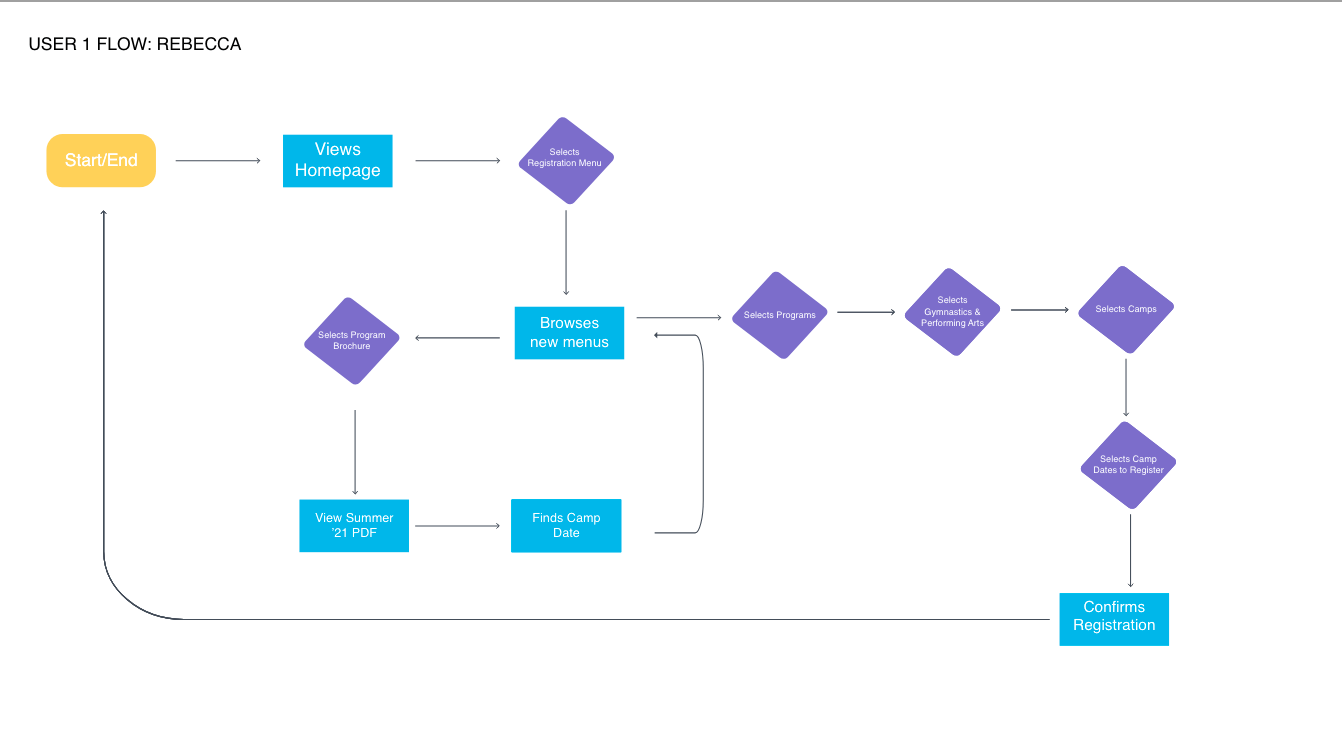
Rebecca | Case 1
- Opens app
- Views homepage
- Selects Registration menu
- Browses menu
- Selects Program Brochure
- Views Summer 2021 PDF
- Finds Camp date
- Returns to Registration menu
- Selects programs
- Selects Gymnastics & Performing Arts
- Selects Camps
- Selects Camps Date & Registers
- Exits app
Sara | Case 2
- Opens app
- Views homepage
- Clicks on Around the Parks
- Views menus
- Selects Report an Issue
- Types in details & submits
- Exits app

Jackson | Case 3
- Opens app
- Views homepage
- Clicks on Parks, Facilities & News
- Clicks Weather Hotline
- Views page of fields and facility locations
- Finds specific field and weather cancellation details
- Exits app
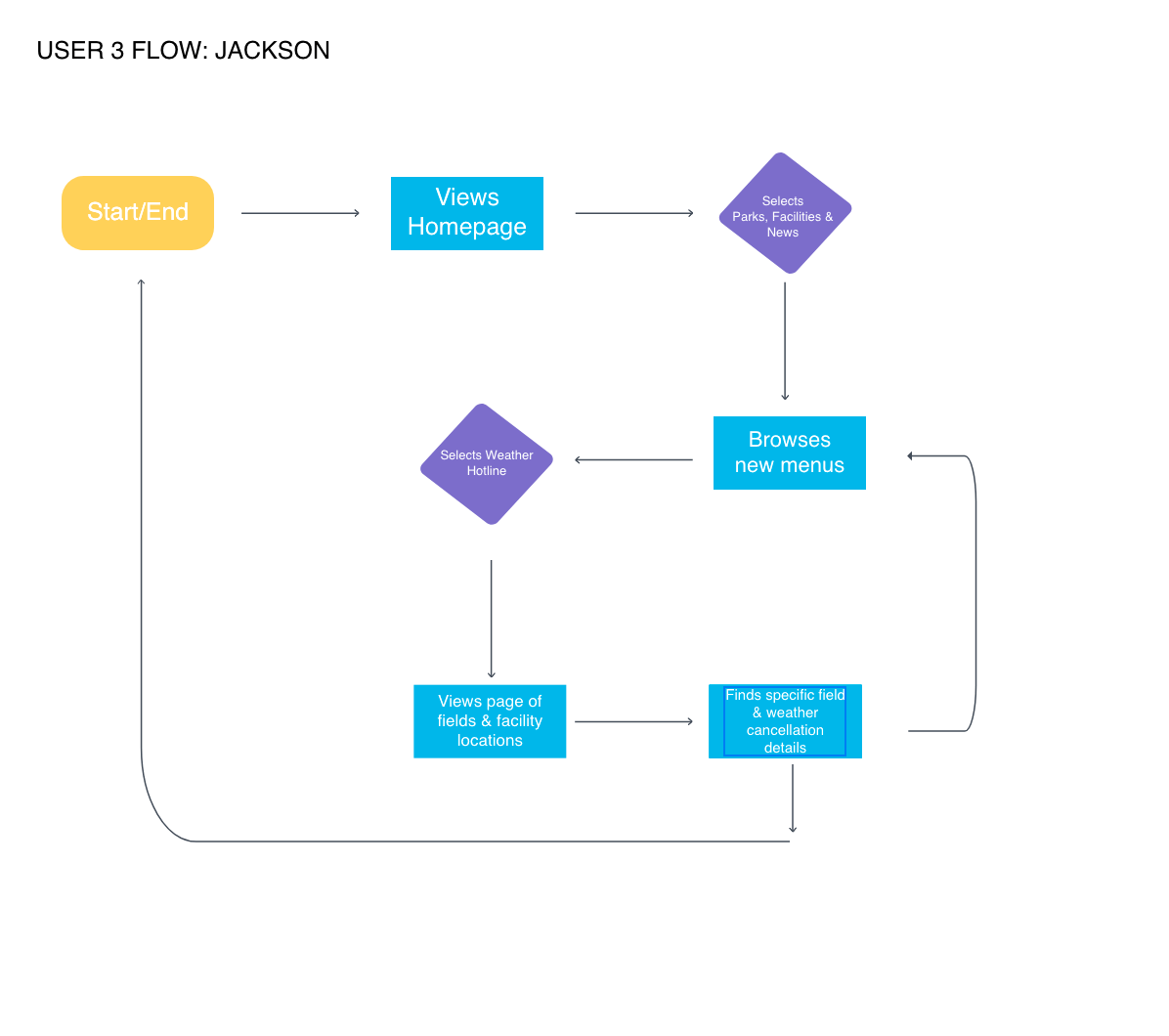
These flow charts help the designer (me) understand how easy/difficult it is to navigate the app. I found that the registration process could be changed a little so that users don’t have to look at a PDF file to see the brochure and then go back to the app menus to register for the app. There could be a way to see the brochure within the app and register for the classes as the next step. This would require the brochure to be part of the menu navigation, rather than a pdf. At this moment, this would be the easiest for the designer, as the brochure is very long and filled with detailed information about hundreds of classes.
This process helped me realize the information above, and it helped me to visualize the navigation within the app.
See the full User Report Flow Chart presentation here:
References
Browne, C. (4 Nov. 2019). How to create a user flow: A step-by-step guide. Career Foundry. Retrieved from https://careerfoundry.com/en/blog/ux-design/how-to-create-a-user-flow/
Browne, C. (14 Oct. 2019). What are user flows in user experience (UX) design? Career Foundry. Retrieved from https://careerfoundry.com/en/blog/ux-design/what-are-user-flows/

