
After weeks of reorganizing, testing and analyzing the design and configuration of a new app, the final prototype days have been completed. I created the idea of an app for the city of Roswell, Ga., that creates a platform specifically for recreational activities in the city. From park and trail maps to art festivals and news, this app would cater to the local Roswell resident and give them a place to find information surrounding their community quickly.
My hope was to build a place for users to come to who want to find something to do around their community quickly and in an enjoyable environment. The Roswell municipality website was overloaded with information, and this app targets recreational and outdoor activities more specifically. It will hopefully be the quick stop for adventurous users looking for fun things to do in Roswell.
Step-By-Step
In the opening stages of creation, as the designer, I began by creating a flow chart of information that would be the basis of the app. The flow chart helped me visualize the flow of the app, and how the user would jump from topic to topic. In addition, I created tasks for users that would ideally use the app.
The next step was to create low-fidelity or paper prototypes of the app’s design. This step helped me visualize the what the app would actually look like on a phone. I sketched out numerous screens and used the tasks to help create the screens I knew a user would need to see to complete those tasks. This process was difficult and time-consuming, but in the end, it would eventually help immensely in the design and testing processes.
Testing
Using the paper prototypes, I used the Pop app to create an app-like prototype that would allow users to walk through the screens with a real-life feel. The Pop app allowed me to test the app prototype on real-life users and see how they navigated the app. The two participants I tested gave me detailed feedback about navigation and menu design that I would implement into the next phase of the design process. The testing process helped me see things that I did not see from the beginning as the designer.
High Fidelity Prototypes
After testing participants on navigating the Recreation in Roswell app, I then moved on to the final stage which included the designing of high-fidelity prototypes. High-fidelity prototypes are designed to appear and function as close to the final product as possible (Babich, 2017). These high-fidelity prototypes are mainly used for more testing or as a presentation for stakeholders.
To create my high-fidelity prototype, I designed the Recreation in Roswell app’s screens in Sketch. It took me a little while to figure out the navigation, but it eventually was super simple to create shapes, text and design the screens. After creating all of the screens, I then linked the pages together in prototype mode and uploaded the screens to Invision.

Here’s a breakdown of the Recreation in Roswell app’s main page:
The four main menus include Registration, Around the Parks, Future Planning/Inquiries and Parks & Facilities. I expanded the main menu from three navigation links to four as my testing participants offered that as an idea due to some concerns during testing.
The Registration menu includes links to Program Brochures, Health & Wellness Programs and Art Programs. This menu is where users will go to sign up for camps and programs in the community.

The Around the Parks menu includes information about Events & Festivals, Park Trail Maps, a Newsletter and the Roswell Arts Fund. This menu will be for users who are looking for information about where parks are located, events that are happening at parks and information about the art located in the parks.
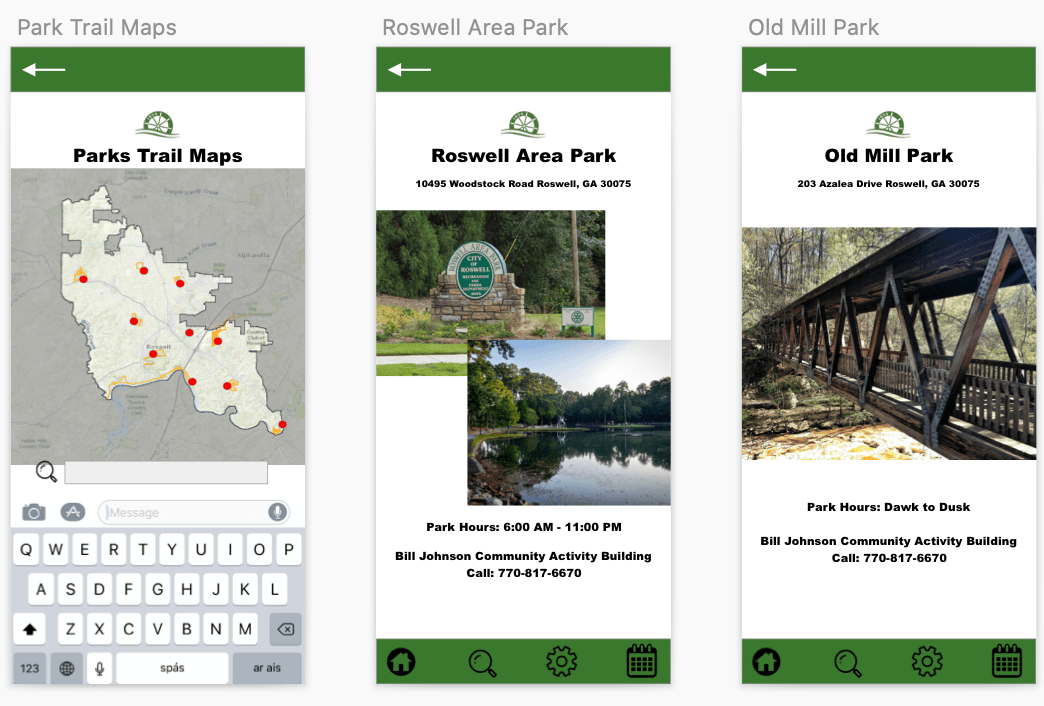
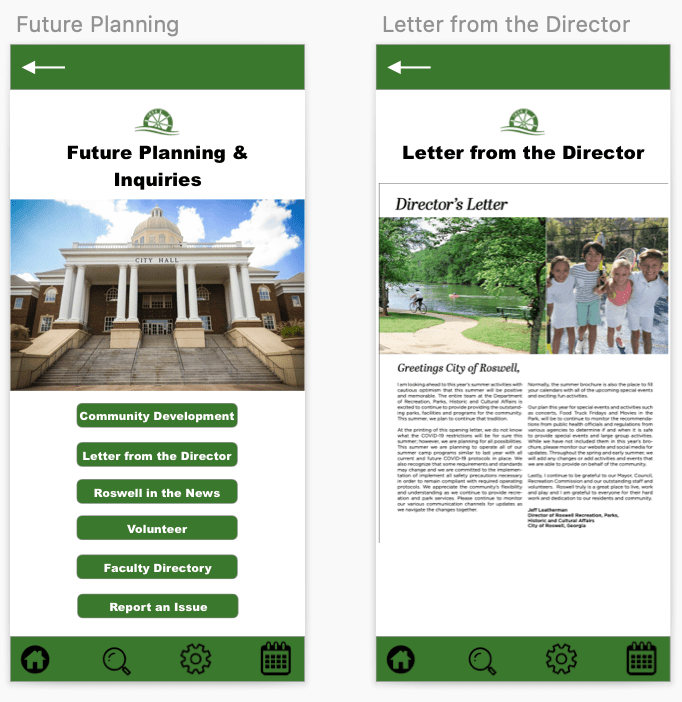
The Future Planning/Inquiries menu is for government and Roswell faculty/staff news. There is a Letter from the Director, an option to report an issue and community development news located in this part of the app.
The Parks & Facilities menu includes a plethora of information about all of the different types of attractions and facilities around the parks in the city. From pools to spray grounds and park trails to tennis courts, this part of the app will be the go-to for users who want to find something fun to do around the city. There is also a weather hotline to find out if fields and facilities are closed due to bad weather.

Final Presentation
To present the navigation of the app, I created a video that shows the app’s features on Invision and walks users and stakeholders through the app’s navigation. You can view the video below.
I also created a final presentation of all of my steps throughout this process. From user flow chart design to paper prototypes, the process used to create the high-fidelity prototype of Roswell in Recreation was a unique and challenging one that taught me a lot about the design thinking process.
Overall, this app design project truly opened my eyes to the design thinking process and what goes into creating an app. It requires thinking ahead, a detailed plan and an open mind, as things come up along the way that the designer might not have thought about. For example, in my process, I did not realize that I had some bias towards the information in the app because I grew up in Roswell. My volunteer participants did not understand what a program brochure was, which in the end, helped me take the action of creating a new menu for it to live in.
This process of creating prototypes was time consuming, but I really grew to appreciate the value of prototyping and how it helps a designer make the best choices for their projects and ideas.
 MAGGIE PRUITT