
Quality over quantity? Or is it quantity over quality?
Well, if we are talking about idea generation in the Design Thinking process, sometimes quantity is better than quality! We still want to have quality ideas, but we want to generate as many as possible through the ideation phase of the Design Thinking process.
In the ideation phase, researchers, designers and creatives work together (or sometimes individually) to compile as many ideas as possible towards a common goal. When creating these ideas, it is better to just get every idea out in the open and noted – the crazier the better!
“You ideate by combining your conscious and unconscious mind. You combine your rational thoughts with your imagination,” (Dam & Siang, 2020).
The researchers and designers will then narrow down the ideas and find the best ones. The ideation phase of the Design Thinking process is the third step; the two steps before ideation are empathize and define.

In the empathize phase, the researcher or designer must understand the user and what makes them tick. What problems does the user experience? What would make their experience [in a certain situation] better? This phase helps the researcher or designer understand why users act or feel the way they do. Having this knowledge will allow the designer or researcher to take it with them into the next phase of the process. In the end, the problems the users experience are what the researchers hope to solve, so this phase is very important.
The next phase of the Design Thinking process is the define step. This step involves the researchers and designers compiling the information they gathered in the empathize phase and specifically targeting a problem and defining it. Personas, which are user profiles of the target audience for whatever the end goal of the process is, are used in this stage. In addition, it is important for the designer or researcher to establish a Point of View or POV statement before moving on to the ideation phase.
Putting Ideation to Work – App Idea
When thinking about my app usage and what apps I enjoy the most, a few came to mind…
I love Twitter, Instagram, my fitness app, Aaptiv and Spotify. I have to have my work email on my phone, so I use the Outlook app (which is rather poor). Obviously, I use the Message app and phone app a lot, as well. In addition, the Google maps app is a very important app to have, but I don’t have to use it too much.
After compiling the list above, I thought most about my music intake and how much I use the Spotify app. I have about a 20-minute commute to work, so I love to listen to music on the way. However, one thing that I try to not do is use my phone while driving. I get frustrated while I am driving if a song comes on that I would like to skip, but I can’t use my phone to skip it.
I thought about one of the playlists I listen to a lot, which has over 30 hours of songs on it. I would normally skip a lot of the songs on the shuffle mode, but since I can’t use my phone, I get stuck on a song that I don’t like. In addition, sometimes I want to change the playlist I am on, especially if I am in the car for a while. How can I address this problem?
The Idea – Spotify in Motion
The idea that I came up with to address my problem is an app called Spotify in Motion. This app would allow users to connect their favorite Spotify playlists to this app, and then, while the user is driving, the user will be able to use a voice command to tell Siri to do numerous actions. This allows the user to keep their eyes and hands on the wheel and also allows them to have more control of their music in the car.

(This app would be especially important for drivers who are not driving newer cars and do not have a touch screen monitor in their console area aka me.)
Users can shout commands like…“Siri, can you skip this song?”, “Hey Siri, can you start this song over?”, “Siri can you play another song that is similar to this song?”, “Siri, can you shuffle this playlist?”
The Ideation Methods
I used Mindmap and Sketching ideation techniques to come up with ideas about the Spotify in Motion app. My presentation is linked above.
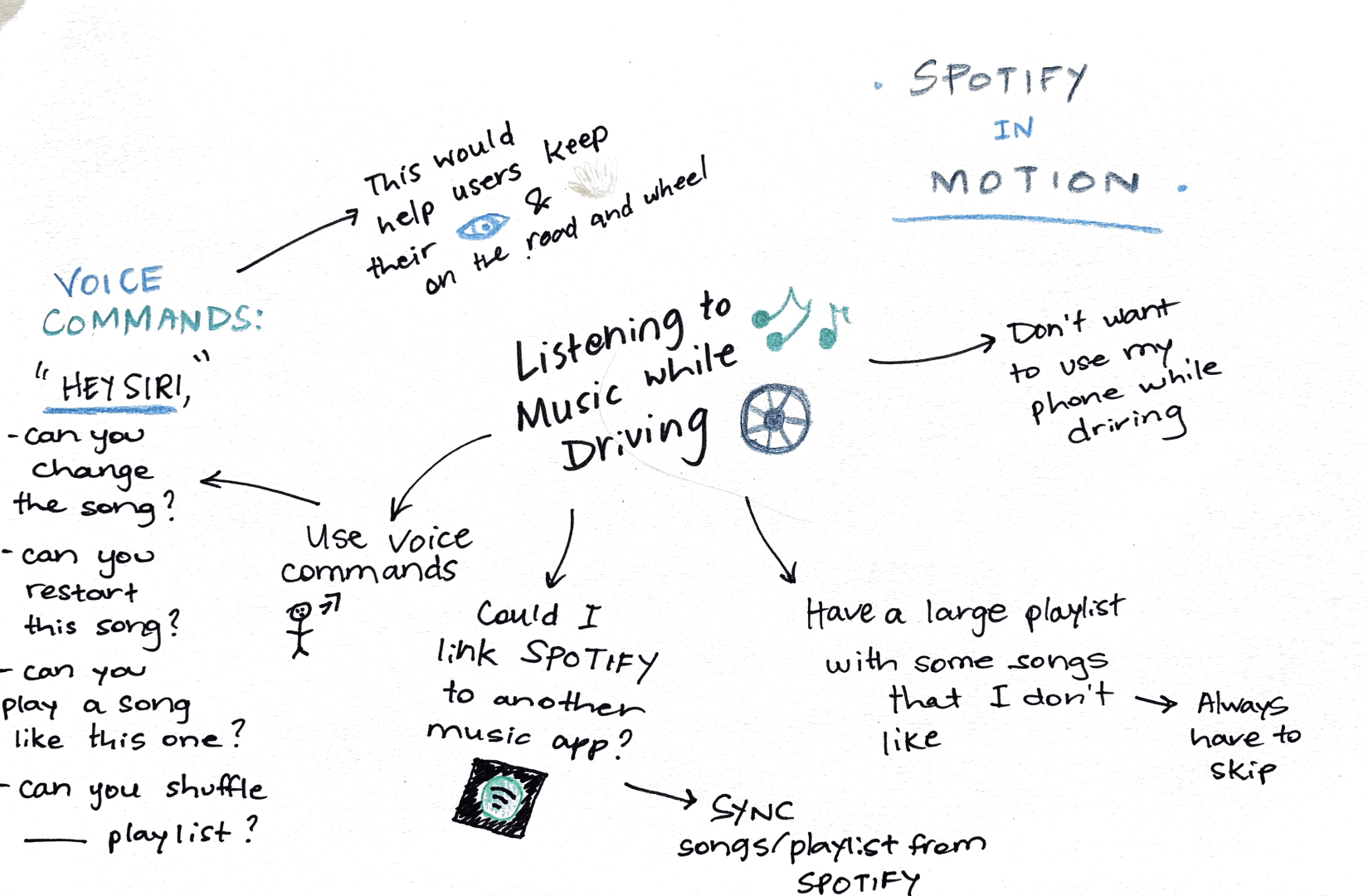
The Mindmap allowed me to see the different parts of the user experience, in this case myself, when it comes to listening to music in the car. I was able to think about the voice commands that would be needed for the users. I added the idea of syncing music from the Spotify app to the new Spotify in Motion app, so that users would not have to transfer all of their songs to a new app; it would just sync up through their Spotify account.

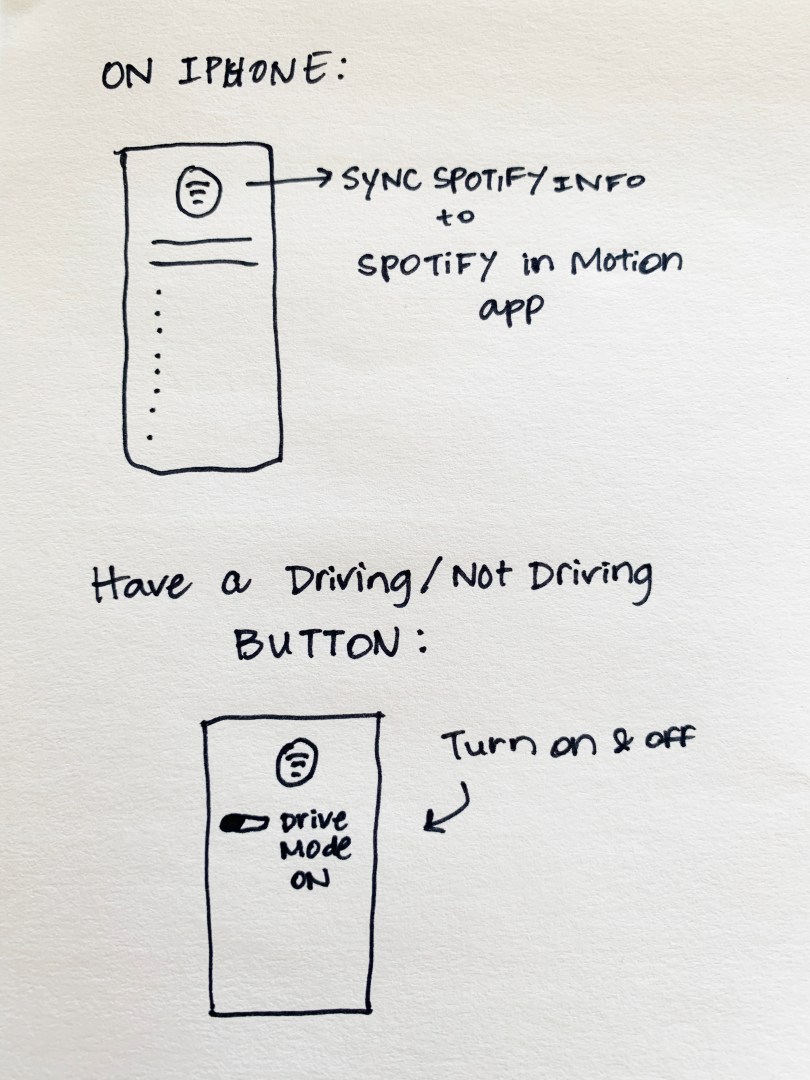
The sketching technique allowed me to think about how the app would be designed and what the user’s car would look like for the Spotify in Motion set up. I added the idea of having a “Drive Mode” button on the app. This button would allow users to turn it on and off when they were about to start driving. This would then turn the Siri voice command feature on, which would allow users to voice commands.
Voice Command examples:
“Hey Siri, skip this song.”
“Siri, can you restart this song?”
“Siri, restart this song over.”
“Siri, can you shuffle this playlist.”
“Siri, can you play ____ playlist.”
Conclusion
The two techniques allowed me to generate ideas about this problem. I actually have thought about this problem in real life and wondered if there was a way to play specific music while driving, but without touching my phone. This exercise allowed me to generate ideas about a new app that could help me solve my problem.
 MAGGIE PRUITT