
It’s about the journey, not the destination.
Well, in this case, it is about a journey map, and the destination is a customer’s goal. A journey map is a creative infographic that shows the process a customer goes on when they are completing a task or a general activity with an end goal. A journey map can focus on a number of different types of customer journeys. In addition, the journey map highlights specific personas related to the journey.
For example, you could create a journey map about a customer buying a house. The personas could be anything from a family of six with specific needs about their house or it could be a single bachelor looking for a temporary place. The journey map is created for those individuals based on their buying process and the positive and negative outcomes within that process.
Putting the Ideas to Action
I created a journey map about the process of a customer using the Starbucks mobile app to order coffee. To begin the exercise, I sketched out the journey map based on how my coffee ordering experience with the Starbucks app.
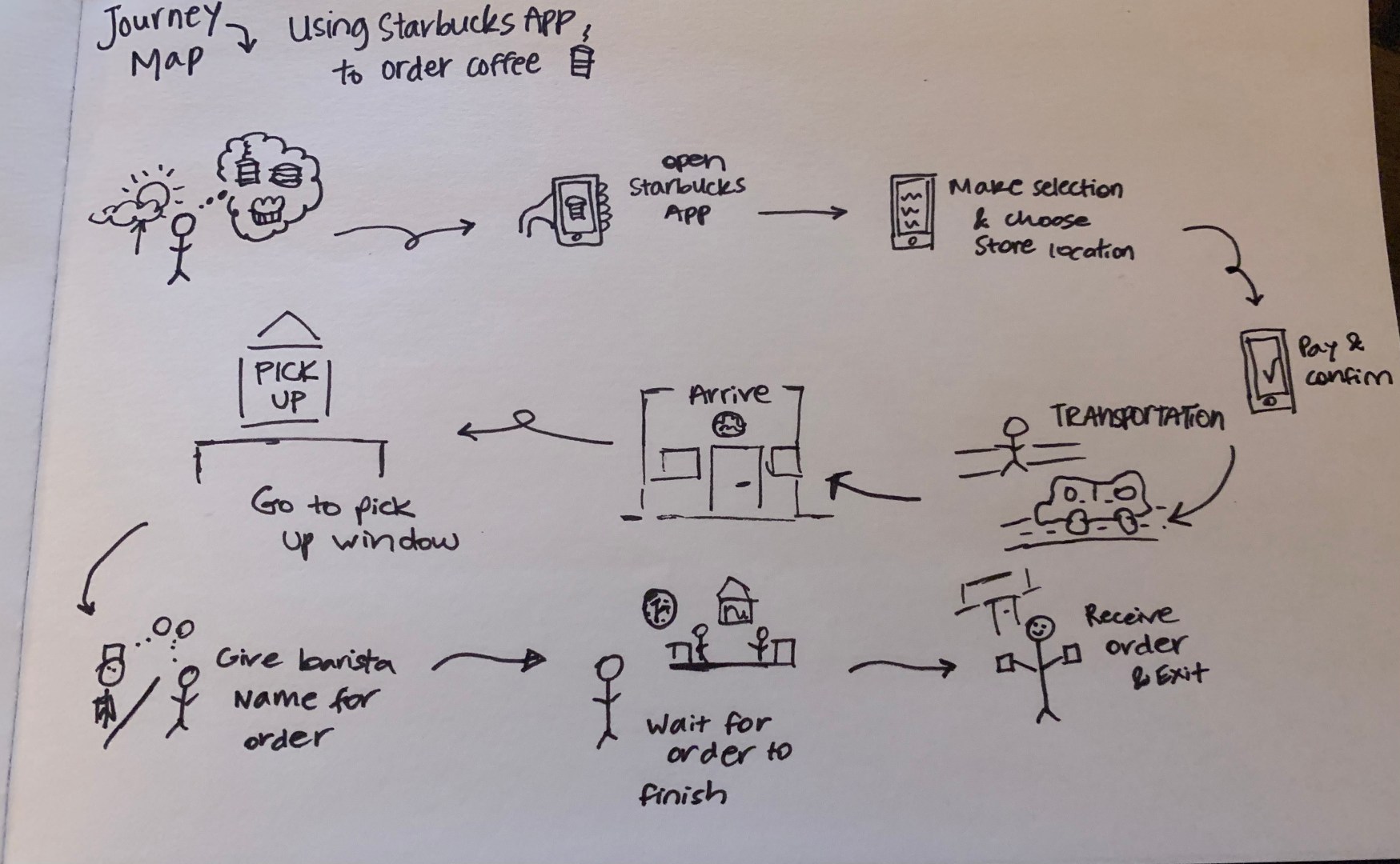
Starbucks Mobile App Map
I created 10 steps within my journey map for ordering coffee:
Think about ordering coffee from Starbucks.
Open the Starbucks App.
Make the selection and choose the store location.
Pay and confirm order.
Get to the store (walk or car).
Arrive at the store.
Go to the Pick Up window.
Give the barista the name for the order.
Wait for the order to be received.
Receive order and exit the store.
After sketching out the rough journey map, I thought about the persona I would use to enhance the finished journey map artifact. Sally Starbucks was used as my persona for the journey map. She is an avid Starbucks drinker who is trying out the mobile app for the first time. Sally will go through each of the 10 steps in the journey map.
She opens the Starbucks app and creates an account. Sally liked how the app remembers her login information and allowed the use of facial recognition. The next step takes Sally to the order page – she likes how she can customize her order, but she wishes she could tell if the store she is going to has a drive thru window or not.
The next few steps revolve around the persona, Sally, traveling to the store, going inside and finding the Pick Up window. Sally gets annoyed if the Starbucks’ parking lots are crowded and if there is no place to park. In addition, Sally remarked that the baristas were not working at the mobile order pick-up station and it took them a few minutes to come over and ask for her name.
Sally noticed that other customers were also waiting for mobile orders, while some customers walked in and had their order already prepared. She figured that the estimated time for the completion of the order is not accurate. Sometimes your order is ready when you get there, and other times it is not, and you have to wait.
How Can We Create a Solution?
This issue has impacted the Starbucks stores since the beginning of the pandemic. The stores mobile order process changed because they cannot have customers touching all of the mobile orders looking for their drinks, so this means that a barista has to work the mobile pick-up station. This creates a line of customers waiting for mobile orders.
A solution to this problem would be to have a more detailed process for picking up mobile orders that gives the app a specific wait time for the customers. If you come into the store and scan your phone, pick up your order and scan the phone when you leave, the app could then create a “waiting period” time stamp on the app for customers coming to pick up.
This could give customers a better idea for how long their order will take. If they live five minutes away, and the order will take 10 minutes to make, then the customer knows to leave their house a little later.
Here is a final design/artifact for my journey map as a screenshot and a PDF file.

 MAGGIE PRUITT